Garritan in GarageBand


GPO Folder Banner copy 2

Welcome to the next in a series of articles to discuss using Garritan libraries in a variety of music software programs. If you’ve never used a VST, Audio Units or RTAS plugin in your favorite DAW or Notation program before, this series will help you get set up and introduce you to some of the features that Garritan has to offer to bring your music to life.

Today we are going to discuss utilizing Garritan sounds in Apple’s GarageBand.The main article deals with setting up GPO to work with GarageBand. To learn more about setting up the Aria player and customizing individual Garritan instruments in GarageBand, Click Here.

GPO in GarageBand

GarageBand is a fantastic tool for composition and sketching ideas; it’s fast and effective, but could benefit from a more detailed orchestral palette! If you already own Garritan Personal Orchestra and use GarageBand, here’s how to install all the patches for GPO directly into GarageBand.

  1. Click the following link to download the .zip file: GPO for GarageBand
  2. Once the download is complete double click to uncompress the file and you should see this folder icon:GPO Folder Steps
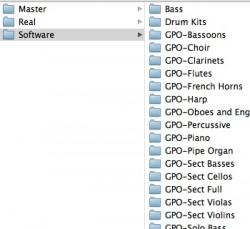
  3. Open a Finder window and follow the path: Macintosh HD >> Library >> Application Support >> GarageBand >> Instrument Library >> Track Settings >> SoftwarePath 3
  4. Place the contents of the “GPO for GarageBand” folder into the “Software” folder.Patches place

The next time you launch GarageBand, you should see all your GPO sounds ready to go!

Please let us know how you get on!

Trumpet release effects in Garritan Jazz and Big Band 3


One of the great things about the Garritan Jazz and Big Band 3 library is how easily you can create trumpet release effects. Depending on your DAW, you’re as close as a click or two away from producing realistic falloffs, doits, and kisses, all techniques that can take a lifetime for even the most seasoned jazzer to master.

First, for the curious or uninitiated, we should probably explain just what these release effects are.

Falloffs, if you haven’t guessed by the name, are when the pitch of the note falls, accentuating notes within the harmonic series during the descent.

Doits are just the opposite, a release effect where the note quickly rises in pitch, and the notes in the harmonic series are again noticeably marked.

Kisses are the characteristic caps at the end of screaming high notes. You’ll know it when you hear it.

Here are the ranges for the Jazz and Big Band 3 (JABB3) trumpets and their release effects.

Garritan Jazz and Big Band 3 keyboard visual of trumpet ranges


Falloffs & doits span from MIDI notes F4 to F6, and kisses are available from MIDI note Bb5 and up.

With Jazz & Big Band 3, all of these trumpet release effects are controlled by MIDI CC15. In your DAW, all you need to do is draw in MIDI data before the end of the note to activate the desired release effect. Trigger kisses by setting CC15 to a value between 127 and 96, doits between 95 and 65, and falloffs between 64 and 33. The only trick is to make sure you turn off release effects before the next normal passage by setting CC15 to a value between 32 and 0.

We’d love to hear how these tips have worked for you. Please tell us how you use the Garritan Jazz and Big Band sound library by leaving us a comment.

More info on the Garritan Jazz and Big Band 3 sound library.

Using Garritan in Pro Tools 10


PTMixerWindow

Welcome to the first in a series of blog posts that will discuss using Garritan libraries in other software programs. Garritan libraries are designed for use in DAWs or Notation programs, and many MakeMusic employees do just that. If you’ve never used a VST, Audio Units or RTAS plugin in your favorite DAW or Notation program before, this series will help you get set up and introduce you to some of the features that Garritan has to offer to bring your music to life.

Here’s Peter Flom from MakeMusic with a guide to using Garritan in Pro Tools 10:

In my background as an audio engineer, I’ve used a number of different methods to capture an artist’s inspiration; from the soul and character of old Ampex 456 tapes to the pristine accuracy of the many digital audio solutions available today. For me, Pro Tools was an obvious choice in making music, not only because of the great features and organizational options it offers, but because it is an industry standard in modern recordings. After I’ve worked out an arrangement with an artist, I want to be able to focus on tracking, rather than designing synthesizers or clicking through countless menus to get started. I use Pro Tools because of its simplicity and speed during recording, through a logical interface and extensive keyboard shortcuts, and I feel that the Garritan Libraries synergize extremely well with this program.

Unlike many sample libraries, Garritan’s Aria player allows you to simply click through only one menu to load the sample you’d like. After loading your samples, many sound very realistic right out of the box with no customization. The Aria player’s elegant engine allows you to use Garritan quickly and efficiently, without taking up much of the computer’s processing power. This also means that the hundreds of plug-ins that can find their way into a tracking session can still be used when the Aria player is active. Finally, I appreciate that when it’s time to dig in and configure the performance precisely, I can have confidence that the Garritan Libraries have a really powerful amount of performer controls, so that I can get exactly the sound I want with little effort.

I most often use a combination of the Garritan Personal Orchestra and Garritan Instant Orchestra to layer with live string instruments, and the World Instruments library to get some unique percussion sounds that aren’t typically in other sample sets. To my ears, Garritan has created a series of useable libraries that rival some of the best samples on the market, but Garritan’s libraries are easier to use, less computer-intensive, and cost much less.

Click here to learn how to use Garritan in Pro Tools 10.

Note: With the release of version 11, Pro Tools no longer supports RTAS plugins, and has moved to AAX plugins. MakeMusic is currently evaluating the scope and technical challenges involved in developing an AAX plugin. Click here to subscribe to our Knowledge Base article so you can be informed of future updates on this subject.

Welcome to the new Garritan Blog


Hello everyone! Over the years the Garritan forum has been our source of community and news. As part of the MakeMusic family, we will be keeping in touch with this new Garritan Blog and our forthcoming new forum.

We have been very busy with various projects and I am excited to be able to share with you some exciting things that are happening.

Thank You for joining me in our new Garritan blog. It is my hope I get to hear from you as well. You continue to inspire me to keep doing what I do!

My best,

Gary Garritan

The Music & Sound Retailer


The Music & Sound Retailer nominated MakeMusic’s Garritan Instant Orchestra for best product in the Software/Multimedia category.

“Our goal for Garritan Instant Orchestra was to offer a completely new type of sound library, designed to create orchestral music very quickly and easily. We wanted to provide an empowering experience where almost any musician can sound like an A-list Hollywood composer, by simply creating just a few staves of music. Being recognized for this development is very gratifying, and it’s an honor to be nominated for this award by Music and Sound Retailer.”
Gary Garritan, MakeMusic Director of Instrumental Sciences

This website uses cookies to improve your experience. By viewing or browsing our site, you are agreeing to our use of cookies. Read our Privacy Policy for more information.

Accept